

When a client operating in a high-scrutiny regulatory environment tells you their website needs stronger security signals, the conversation usually turns to infrastructure — not the CMS.
But for Webflow sites, those two often get conflated, and agencies default to one of two answers: replatform, or tell the client it isn't possible.
There's a better path.
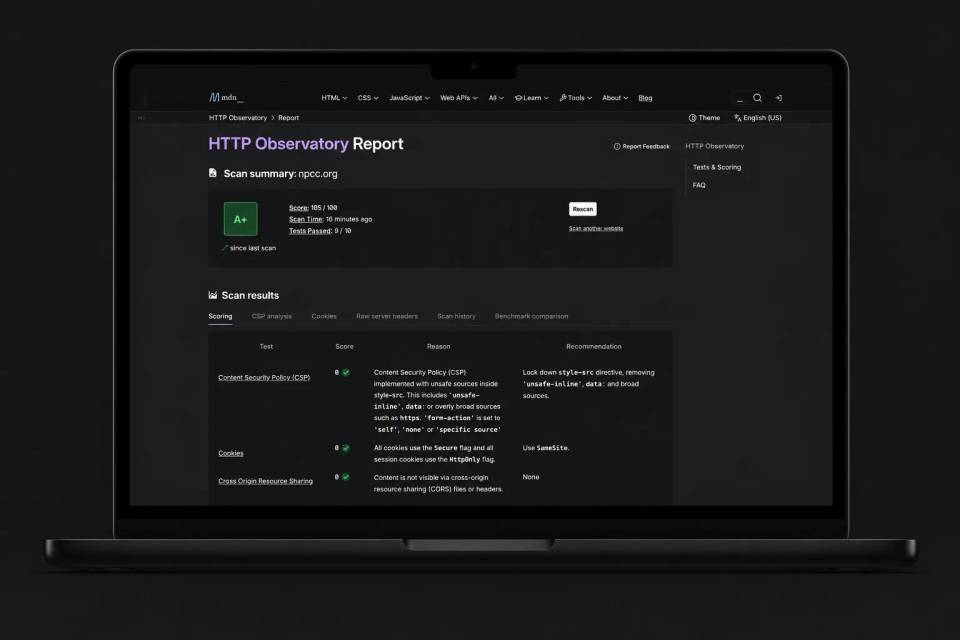
At Scaler Marketing, we worked with NPCC (npcc.org), — the Northeast Power Coordinating Council, — to bring their site’s MDN HTTP Observatory score from 55 to 105/100. The site stayed on Webflow. Content updates still work the same way they always did. But now there’s an edge security layer that gives NPCC the kind of header hardening that scanners expect from enterprise infrastructure.
This post is a breakdown of why the problem exists, how we solved it, and when this approach is best.
Webflow is excellent for building and shipping fast — that's why we use it, and why we've built our agency around it. Like any hosted CMS, though, Webflow doesn't expose deep control over HTTP response headers. That's by design: the CMS layer isn't where that control belongs.
For most sites, that’s fine. But NPCC isn’t most sites. They operate in an environment where security posture matters — where third-party tools like BitSight and MDN Observatory are actively scoring your headers and those scores get reviewed.
When we ran NPCC’s site through Observatory, it scored a 55. The gaps were exactly what you’d expect: missing or weak Content Security Policy, no Permissions Policy, default Referrer Policy, no MIME sniffing protection. The standard list of headers that require server-level configuration, something a hosted CMS isn't built to expose.
Move the Security. Keep the CMS.
The answer was to stop thinking about this as a Webflow problem and start thinking about it as an architecture problem.
Rather than replatform, we moved security enforcement to the edge where it belongs. The Webflow site stays exactly where it is — it’s still the CMS, still the renderer, still the place where the NPCC team manages their content. But the domain now routes through Cloudflare, and a Cloudflare Worker sits in the request path as a gatekeeper.
The Worker does three things: it fetches the content from the Webflow origin, it injects a full suite of security headers into every response, and it applies a nonce-based Content Security Policy that’s strict enough to score well but smart enough not to break the site.
Webflow remains the CMS. Cloudflare becomes the security perimeter. Best of both worlds.
How We Built It
Baseline first, build second
We started by running the site through MDN HTTP Observatory to get a concrete list of what scanners were flagging. This matters more than it sounds — you don’t want to guess at which headers to implement. You want the actual scorecard telling you where the points are.
Webflow on a subdomain
We attached Webflow hosting to an origin subdomain — something like webflow.npcc.org. This becomes the host that Cloudflare fetches from. The primary domain routes through Cloudflare so it can actually intercept and rewrite the responses.
The Worker as gatekeeper
The Cloudflare Worker sits in the request path and does the heavy lifting. It rewrites the upstream host to the Webflow origin, fetches the content, and returns the response with security headers applied. For NPCC, that meant adding X-Content-Type-Options: nosniff, a strict Referrer-Policy, a locked-down Permissions-Policy, and more.

None of this is exotic technology. But knowing which headers to set, how strict to make them, and how they interact with the rest of the site — that’s where the experience matters.
CSP without breaking the site
This is usually where things go wrong.

Webflow sites load a lot of scripts: the Webflow runtime, tag managers, analytics, cookie consent tools, third-party widgets like Jetboost or search. A strict Content Security Policy will block all of them if you’re not careful. You’ll go from a 55 to a blank page.
We used a nonce-based approach. The Worker generates a unique nonce for each HTML response, injects it into the script tags in the markup, and sets the CSP header to only allow scripts carrying that nonce — plus a targeted allowlist of third-party domains that need to load externally. That’s what lets you score high on CSP without nuking the site’s functionality.
Test everything, then test it again
Once a strong CSP is in place, anything that loads a script becomes a potential break point. We tested key pages, navigation, forms, cookie banner behavior, and every page that loads a third-party widget. When something got blocked, we updated the allowlist. This isn’t a “deploy and walk away” situation — it’s methodical.

Validate the score
After everything was stable, we re-ran Observatory.
Result: 55 → 105/100.
The Tradeoff You Need to Know About
This approach works extremely well. But it’s not “set and forget.”
The big tradeoff is maintenance. If NPCC adds a new third-party script — a new analytics tool, a chat widget, anything that loads JavaScript — the Worker and CSP may need to be updated so those scripts aren’t blocked. That’s a real operational consideration, and it’s why we treat this as a site-by-site decision rather than something we roll out across every Webflow project by default.
For NPCC, it’s the right call. For a marketing site that’s adding new tracking scripts every month without a review process, it probably isn’t.
When This Is Worth Doing
This setup is a great fit when the organization is subject to audits, compliance requirements, or higher scrutiny. When scanner scores matter — BitSight, Observatory, similar tools. When you want to stay on Webflow but need the kind of controls that normally require a traditional server.
It’s usually overkill when the site is low-risk and doesn’t need strict scanning targets, or when the team is frequently adding marketing scripts without a review process.
The decision comes down to a question we ask on every project: what does this specific client actually need? Not what’s trendy, not what’s the most technically impressive — what solves the problem in front of us in a way that’s maintainable.
Scanner Scores Are a Signal, Not a Strategy
A 105/100 on Observatory is a strong result. But scanner scores are a benchmark, not a replacement for a broader security program. What this approach does is give Webflow sites the missing “server-level” hardening controls that scanners expect — without leaving the Webflow ecosystem.
At Scaler, we build on Webflow because it's the best platform for the work our clients need. And when a specific requirement sits outside the CMS layer, like enterprise security headers, we build the architecture that extends it. That's not working around Webflow. That's what it looks like to be a real Webflow partner.