

The Premise
Content teams spend a lot of time thinking about what happens before hitting publish. Is the article accurate? Does it properly answer the reader's question? Are the statistics current? Is it genuinely useful?
Content freshness raises another question: What happens after we press Publish?
We know when a page has changed, but how does Google actually realize a URL is worth re-evaluating?
Webflow adding page-level <lastmod> timestamps to automatic XML sitemaps is a great example of where content strategy meets technical SEO. Here is how an update actually moves through its lifecycle:
Identify the need → make a meaningful improvement → publish it → communicate the change → allow search engines to recrawl and reassess the page.
This isn't about gaming freshness signals. It's about creating better content and giving search engines the clear technical signals they need to notice it.
What does "fresh content" actually mean?
Freshness and recency are not the same thing.
A five-year-old guide can still be the single best answer on the web if the core topic hasn't changed. Meanwhile, a six-month-old article about software, regulations, pricing, or industry research might already be completely outdated.
Instead of asking “How old is this page?” ask:
Has anything changed that makes this page less useful than when we published it?
Possible signs include:
- Outdated facts or statistics
- New research
- Product or platform changes
- A shift in search intent
- Important questions the article does not answer
- Stronger insights from our own experience
Freshness isn't defined by a date; it depends on whether the content remains trustworthy and useful.
Does updating old content help SEO and when should you refresh it?
What makes an update valuable for SEO?
Updating a page isn't an SEO shortcut on its own. Search engines don't hand out bonus points just because you tweaked a page yesterday.
Freshness matters more for some searches than others. Someone looking for the latest Webflow features, regulations or benchmarks needs current information. Someone researching an established principle may not.
An update earns SEO value when it makes the page a better result by improving its:
- Accuracy
- Completeness
- Alignment with search intent
- Evidence
- Structure and navigation
- First-hand expertise
Simply bumping the publish date without making real improvements doesn't trick search engines, and it certainly doesn't help readers.
When does a page need refreshing?
Avoid updating articles on an arbitrary six-month or annual rotation. Rely on data and real-world triggers instead.
Clear triggers include outdated data, changed regulations, product updates and recommendations that no longer make sense. Other signs require investigation:
- Sustained losses in impressions, clicks or rankings
- Different types of pages appearing in the SERP
- New questions emerging around the topic
- Stronger competing resources
- Outdated screenshots, examples or links
- Impressions without clicks
- Advice that is technically correct but no longer reflects how we would answer the question
Use Google Search Console to see which queries still perform, which have declined and whether impressions, clicks or average position have changed.
Start with a proper diagnosis before jumping into edits. A drop in traffic could stem from seasonality, lower search demand, technical bugs, new SERP layout features, or stronger competitors, not necessarily stale copy.
What should change during a content refresh?
Review the page as a whole rather than looking for a few sentences to alter.
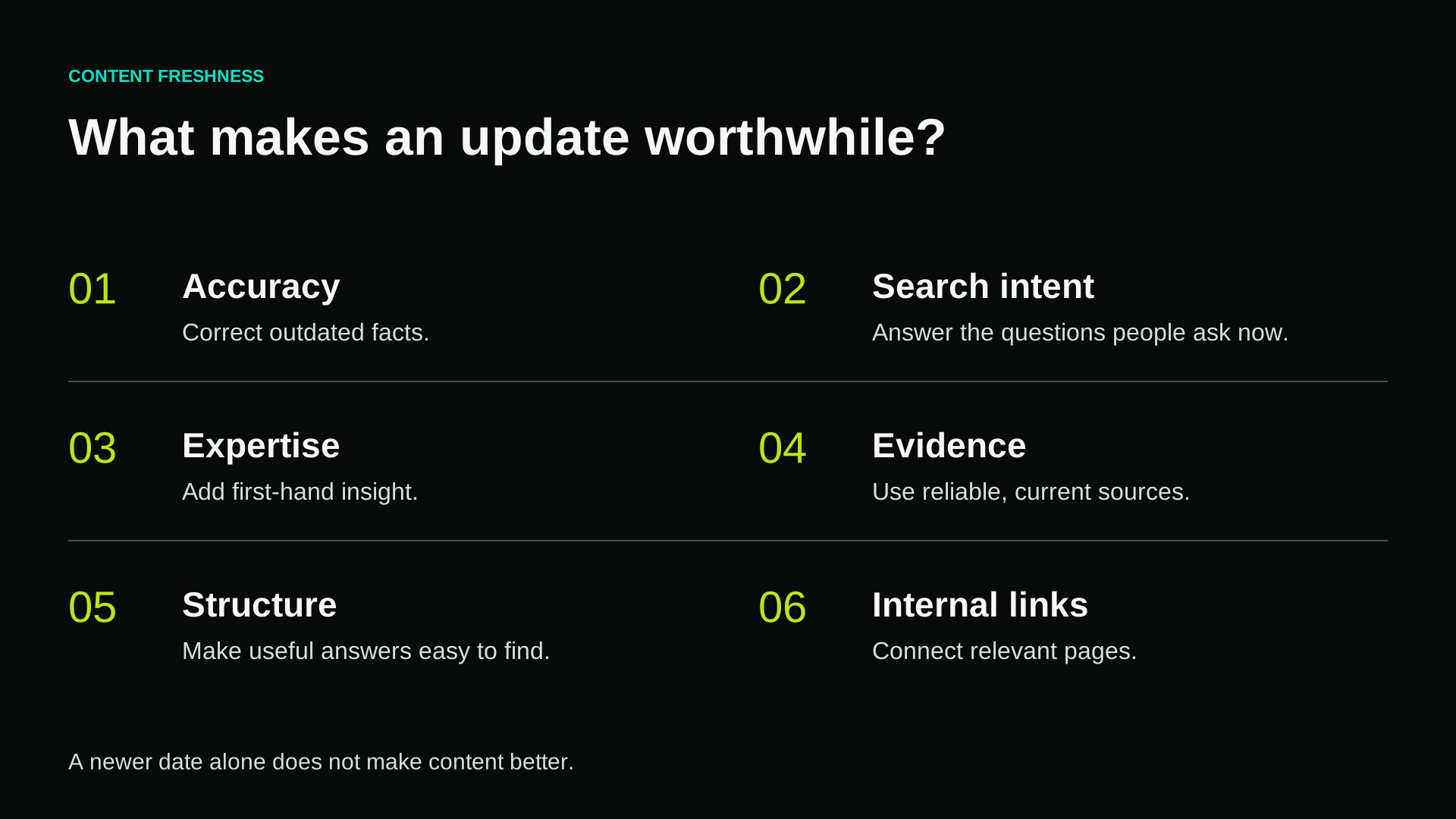
Accuracy
Are the facts, statistics, recommendations and examples still correct?
Search intent
Does the page still answer what people are looking for?
Expertise
Can we add a first-hand example, client insight or stronger point of view?
Evidence
Are the sources reliable and current?
Structure
Can readers find what they need right away? Cut out long-winded intros and fluff that no longer add value.
Internal links
Connect to relevant pieces published since the original article went live. Smart internal links help both readers and crawlers understand how your piece fits into your site's broader information architecture.
What happens after you press Publish, and how does <lastmod> help?
Hitting publish might feel like the finish line for a content team, but for Google, it's just the start of finding and processing the new version.
Page updated → Published → Change discovered → URL recrawled → Updated content processed → Search systems reassess the page
These stages are related but distinct:
- Crawling: Googlebot requests the URL and retrieves its content.
- Indexing: Google processes the content and may update the information it stores about the URL.
- Ranking: Separate systems decide whether and where the page should appear for individual queries.
Just because you hit publish doesn't mean Google sees the change right away and a recrawl doesn't guarantee a higher rank. Sitemaps act as helpful hints for discovery, not strict instructions.
What is <lastmod> in an XML sitemap?
A standard XML sitemap entry can look like this:
<url>
<loc>https://example.com/article</loc>
<lastmod>2026-09-21</lastmod>
</url>
<loc> identifies the URL. <lastmod> records when it was last significantly modified. Google expects the value to follow the W3C Datetime format, either as a date (YYYY-MM-DD) or a full ISO 8601 timestamp with a timezone offset (YYYY-MM-DDThh:mm:ss+00:00).
Google uses <lastmod> to help schedule recrawls, provided the timestamps are consistently reliable. If a site repeatedly flags unchanged pages with fresh dates, search engines quickly learn to ignore the signal.
What counts as a "significant" modification?
Google refers to the last significant modification, not every edit.
Examples include:
- Substantial changes to the main content
- Added or updated structured data
- Meaningful changes to links on the page
A rewritten guide with updated stats and new advice counts as significant. Tweaking a typo or updating a copyright year in the footer does not.
This matters in automated CMS environments. A custom sitemap generator should not set:
lastmod = current build time
for every single URL whenever a site builds. That reflects build times, not actual content updates.
Where possible, derive <lastmod> from the content record's meaningful modification or publication state.
Webflow's 2026 <lastmod> update
On August 20, 2026, Webflow introduced page-level <lastmod> timestamps for automatically generated sitemaps. Each entry can now show when that page was last published.
Webflow also improved sitemap behaviour around targeted publishing and canonical domains. In supported single-page publishing workflows, updating one page can change its sitemap data without republishing unrelated pages.
This removes implementation work for teams that would otherwise need a custom sitemap, but one distinction matters:
Webflow knows when a page was published. Google cares whether it changed significantly.
These usually align during real updates, but republishing an untouched page just to update a timestamp adds zero value.
Google documents <lastmod> as a crawl-scheduling signal, not a ranking signal. A sitemap does not increase rankings or guarantee indexing.
<lastmod> vs dateModified: what each signal does and doesn't
Websites can communicate freshness in several places.
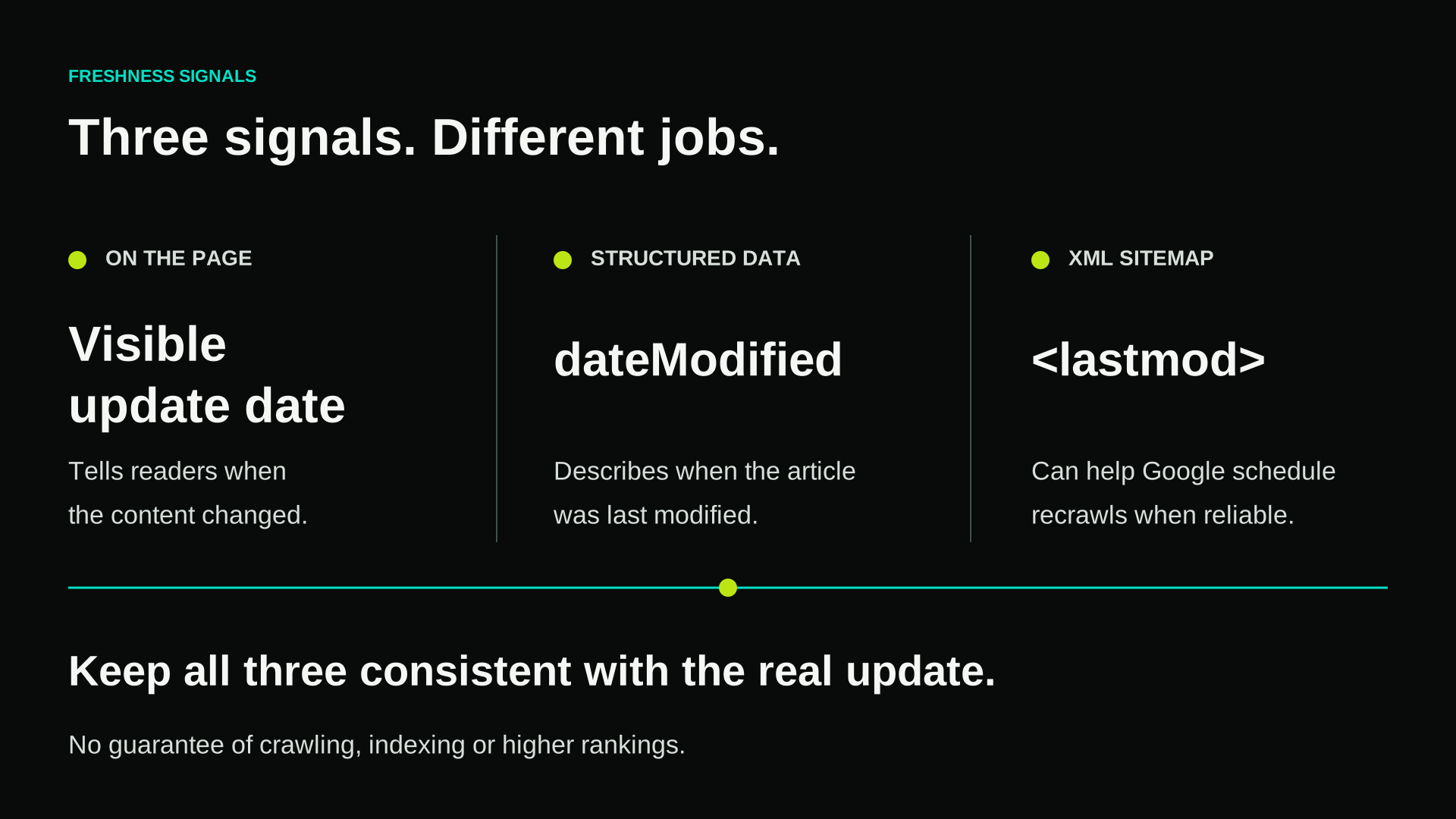
<lastmod> Appears in the XML sitemap and helps crawlers discover and schedule updates.
dateModified Appears in structured data such as “Article” or “BlogPosting” JSON-LD and describes when the article was last modified.
For an updated article, a consistent implementation may include:
- Visible page: Last updated: September 21, 2026
- Article structured data: `"dateModified": "2026-09-21T..."`
- XML sitemap: `<lastmod>2026-09-21...</lastmod>`
While these elements serve different roles, they shouldn't contradict each other. If your page text says March, your structured data says June, and your sitemap says today, search engines won't know which freshness signal to trust.
What <lastmod> does and what it doesn't
Google documents accurate <lastmod> values as a crawl-scheduling signal. The role of this field in source selection by individual generative AI systems is less transparent.
Avoid claims such as “Add <lastmod> and get cited by AI.”
A more defensible position is: Accurate, machine-readable freshness information supports a coherent content system, but no single signal guarantees selection or citation by an AI answer engine.
How should SEO teams and developers work together on this?
A content marketer knows why something changed. A developer knows how that change is represented and delivered. Both perspectives are needed.
Content and SEO teams should own:
- Deciding whether an update is meaningful
- Maintaining factual accuracy and search intent
- Updating evidence and examples
- Protecting valuable existing query coverage
- Identifying internal-link opportunities
- Deciding when a visible “Last updated” date is justified
Developers and technical SEO teams should own:
- Keeping important URLs crawlable and indexable
- Maintaining accurate sitemap generation
- Choosing a reliable source of truth for `<lastmod>`
- Validating canonical URLs and structured data
- Preventing deployments from refreshing timestamps site-wide
- Monitoring crawler behaviour when needed
Both teams should treat publication as part of the wider growth and performance workflow, not the end of it.
How do you check whether <lastmod> is working?
For a Webflow site, open /sitemap.xml, find the page and confirm that:
- The correct canonical URL appears
- The entry contains a
<lastmod>value - The timestamp reflects when the page was last published in Webflow
- The URL has not been excluded accidentally
Then use Google Search Console:
- Check the sitemap: confirm that Google knows about the sitemap and can process it.
- Inspect the URL: use URL Inspection to review Google's current information about the page. Request indexing only when there is a legitimate reason.
For larger or more technical sites: use server logs to see when Googlebot requested the URL.
This makes it possible to compare:
content update → `<lastmod>` change → Googlebot recrawl
Compare the timing of the content update, the <lastmod> change and subsequent Googlebot visits. This shows the sequence of events, but it does not prove that <lastmod> caused the recrawl.
What about AI search?
Search is becoming more machine-mediated, but the answer is not to manufacture fresh-looking pages for LLMs.
Keep the publishing infrastructure clean and focus on:
- Accurate information
- Explicit dates where useful
- Trustworthy sources
- Clear section structure
- Consistent structured data
- Strong site architecture
- Descriptive internal links
- Original expertise
Technical clarity can make information easier to retrieve and interpret. It cannot manufacture authority.
A content refresh checklist for SEO and development
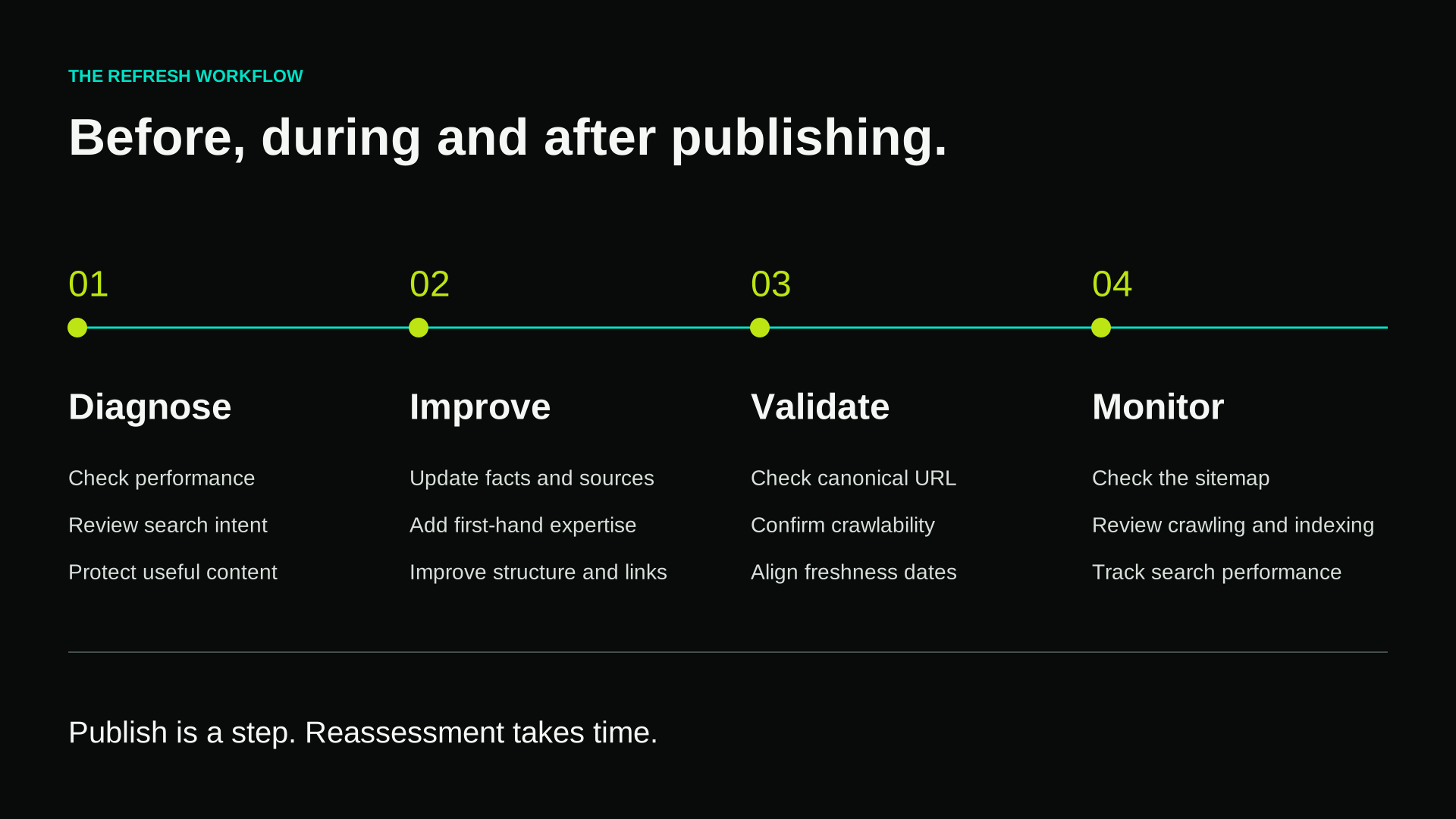
Before editing:
- Has search performance or search intent changed?
- Is the information outdated?
- Which queries does the URL already rank for?
- Which valuable sections should we protect?
During the refresh:
- Update outdated facts, evidence and examples
- Add meaningful first-hand expertise
- Remove sections that no longer help
- Improve headings and structure
- Add relevant internal links
- Check external references
- Keep the URL unless there is a strong reason to change it
Before publishing
- Check the title and meta description
- Confirm the canonical URL
- Confirm the page remains crawlable and indexable
- Use a visible “Last updated” date only when justified
- Keep the visible date, `dateModified` and
<lastmod>consistent - Validate structured data
- Check that internal links use canonical URLs
After publishing
- Confirm the page and updated
<lastmod>value appear in `/sitemap.xml` - Use URL Inspection when an indexing request is justified
- Monitor crawling, indexing and performance separately
- On larger sites, compare CMS publish data, sitemap timestamps and server logs
- Allow time for recrawling and reassessment
Conclusion: Content freshness is a shared responsibility
Technical signals can't salvage a superficial update. Content teams need to ensure the page remains truly useful and aligned with search intent, while developers make sure the CMS communicates those changes clearly to search engines.
That is the wider lesson behind Webflow's <lastmod> update:
The content must deserve another look, and the technical system must make that look possible.