
At the time of writing, both stores ran on the stacks described below. Since then, AI-assisted development has made it practical to move both sites fully onto Shopify, and we've done so. Part two covers that migration: what changed, what we kept, and what we'd recommend today.
Connecting Shopify to Webflow can give a business the website it wants alongside the ecommerce tools it needs. But choosing how to connect them depends on what customers buy, and how the business operates.
For AVS Bio, a ready-made connector supported a straightforward online store. For Insure Cryo, thousands of product variations, a custom configurator and an integration with NetSuite called for a bespoke system.
Both projects used headless Shopify on Webflow. The requirements behind them led to different builds.
I led AVS Bio’s ecommerce integration and designed and built Insure Cryo’s custom commerce system at Scaler Marketing. My approach started with understanding the catalog, the buying journey and what the client needs to manage after launch.
The best stack is the lightest one that fits. We only go custom when a real requirement forces it, and with Insure, several did.
What is headless Shopify on Webflow?
Headless Shopify separates the website customers browse from the commerce system behind it.
In these projects, Webflow provides the website’s design, pages and marketing content. Shopify handles commerce functions such as products, payments, checkout and orders. A connector or custom integration allows the two to work together.
Customers browse the Webflow website, choose their products and complete their purchase through Shopify’s checkout.
This arrangement suited AVS Bio and Insure Cryo because both needed a substantial marketing website alongside their store. Their sites explain products and services, support campaigns and help buyers understand their businesses. Marketing teams also need to update that content over time, a principle we explore in our guide to building a scientific website that evolves with your business.
Webflow gave the marketing teams a place to manage that content and Shopify gave the store teams an admin built around running ecommerce.
The next decision was how much work the connection between them needed to do.
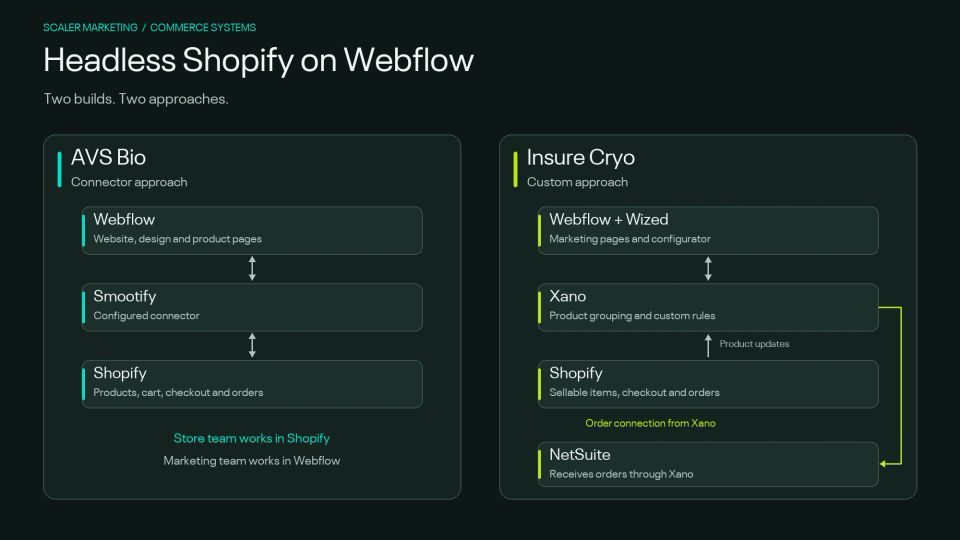
Two approaches to headless Shopify on Webflow: AVS Bio uses Smootify; Insure Cryo uses Xano and Wized, with orders passed to NetSuite.
AVS Bio: connecting a straightforward catalog with Smootify
AVS Bio supplies biological materials to laboratories and the pharmaceutical and vaccine industries. Its website supports two distinct buying processes.
Customers request quotes for avian products and services. Research antibodies and proteins can be purchased online.
Following an acquisition, AVS Bio needed to bring the antibodies and proteins store under its own brand. Scaler was also redesigning and rebranding the wider website in Webflow. My role was to build the ecommerce integration.
The catalog contained approximately 196 products. Most came in one size; the remaining products offered a small number of pack-size choices.
The purchase process was straightforward: find a product, choose a size and pay.
Why a connector fitted the project
I chose Smootify to connect Shopify with Webflow.
Smootify imports product records into Webflow’s content management system and fetches live commerce data from Shopify. This allows the website to generate individual product pages while retrieving prices, stock and purchase options when customers browse.
This gave AVS Bio a store within its Webflow website without requiring Scaler to build a custom connection from scratch.
The choice matched the catalog, buying process and need to launch promptly.
The detail behind a simple buying journey
A straightforward catalog still needs careful implementation.
I set up Shopify, configured fulfillment and shipping, and adapted the catalog, product pages and cart.
Temperature-sensitive shipping required particular attention. Some products travel on dry ice and others on blue ice, with different rates for each destination country.
Product pages also needed the information laboratory buyers use to assess an item, including datasheets and certificates of analysis. The cart collected business details such as a billing email, VAT number and purchase-order number.
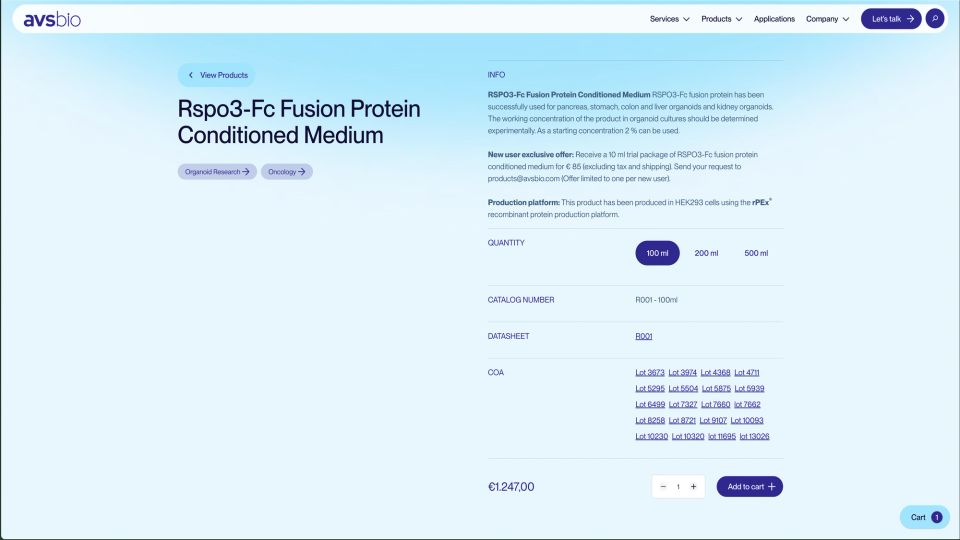
AVS Bio brings technical information, pack-size choices, supporting documents and purchasing controls into one Webflow product page.
The finished website supported both purchasing routes: online checkout for antibodies and proteins, and quote requests for the avian range.
The client manages store administration in Shopify and marketing content in Webflow. Scaler handles integration issues when they arise.
Insure Cryo: building around thousands of product variations
Insure Cryo needed a more complex buying experience.
A typical product could have between 1,000 and 2,000 variations, with some reaching approximately 3,000. Its previous store presented variations as separate products, creating roughly 10,000 pages that were difficult to manage.
The new website needed to bring related variations together on a single product page and help shoppers identify the exact item they needed.
Customers also needed to choose specifications in any order. They could start with the first option, the last option or somewhere in the middle, then refine their selection.
I designed and built a custom system using Webflow, Shopify, Xano and Wized:
- Webflow holds the marketing pages and product content.
- Shopify stores the sellable items and handles commerce.
- Xano groups product data and runs the custom business rules.
- Wized handles the interactive behavior on the website.
A product configurator that lets shoppers start anywhere
Insure Cryo’s configurator shows why the buying experience mattered to the architecture.
When a product page loads, it retrieves the variations for that product. The browser then uses that information to narrow down the available combinations as the shopper makes selections.
It does not need to request a new answer from the server after every choice.
Think of a car configurator that lets you begin with color or engine type. Each selection helps identify a matching vehicle, whichever order you make the decisions in.
For Insure Cryo, this brought the choices together within one product page and gave me control over how the selection process worked. The aim was to make the B2B buying journey easier to navigate, allowing customers to explore specifications in the order that made sense to them.
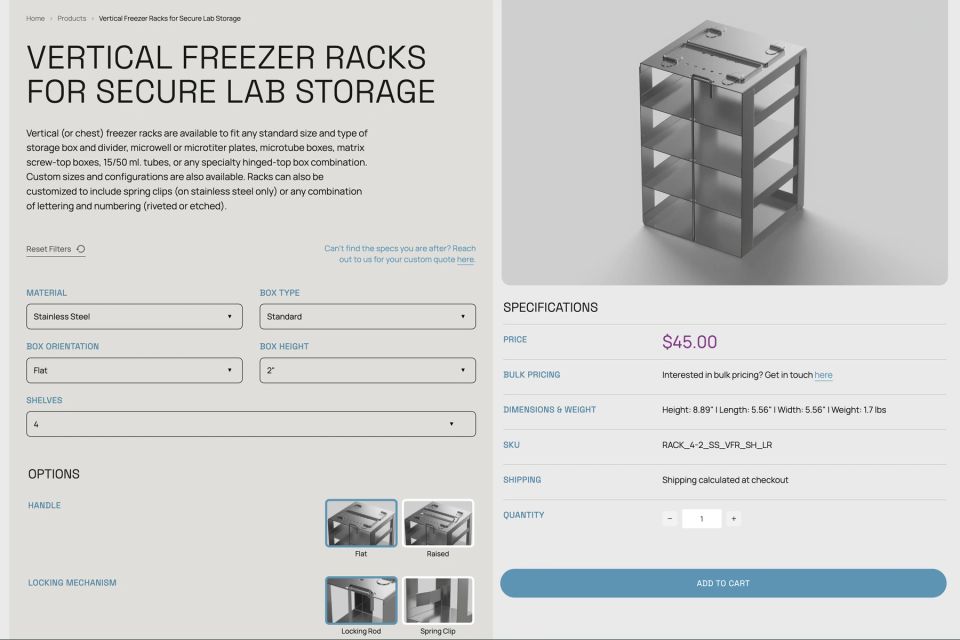
Insure Cryo combines specification selectors, product options, pricing and the matching item on one product page.
Behind the scenes, each sellable variation is stored as a separate Shopify product. Xano groups those items into the product families customers see on the website.
That distinction between the underlying catalog and the pages customers browse was important. Each product family had a dedicated Webflow page for its marketing content, while the configurator handled the variations. It reflects the importance of organizing website content into a clear structure, with a defined purpose for each page.
Shopify increased its product variant limit to 2,048 in October 2025. Insure Cryo’s largest product families still exceed that number, while the configurator and operational integrations add further requirements.
Connecting checkout to NetSuite
The work extended beyond product selection.
Insure Cryo needed orders to reach NetSuite, its operations system. I built the connection so orders pass through Xano and into NetSuite automatically.
Product changes in Shopify also flow into Xano. Webflow separately holds the marketing content for the product pages.
Testing had to cover the whole journey: selecting an item, adding it to the cart, completing an order and passing the information to the operations team.
That connection is part of the value of the custom build. It also creates an ongoing maintenance responsibility. The client handles everyday content and store administration, while changes to the configurator, integrations or business rules require Scaler’s involvement.
Connector or custom Shopify integration: which fits?
The two projects illustrate how requirements shape the approach.
Before choosing a Webflow and Shopify integration, establish:
- How many products, options and combinations customers need to navigate.
- Whether pricing, shipping or ordering involves special rules.
- Which systems need to receive product and order information.
- Who will manage the website and store after launch.
- What budget is available for ongoing technical support.
Testing the most demanding requirement early can help establish whether a connector will fit before committing to the full build.
When headless Shopify may be unnecessary
A standard Shopify website may be the simpler choice when ecommerce is the main purpose of the site and a Shopify theme meets the business’s needs.
Headless introduces separate systems for the website and store, plus a connection that someone must maintain.
App compatibility also needs checking. Apps that display features on Shopify theme pages may need additional work to function on a Webflow storefront, so compatibility with a headless setup should be assessed individually.
For AVS Bio and Insure Cryo, combining the platforms supported the wider marketing website as well as the store. Another business may benefit from keeping everything in one platform.
Start with the buying journey
My work on these projects began with understanding what customers needed to buy and what the client needed to run.
For AVS Bio, that meant configuring established tools and connecting them carefully. For Insure Cryo, it meant designing a system around complex product choices and an operational workflow.
Choosing between those approaches requires attention to the details: the catalog, shipping rules, product selection, order handling and maintenance.
If you’re considering Shopify for a Webflow website, talk to Scaler Marketing about your ecommerce requirements. We can help assess what needs configuring, what needs connecting and where a custom build may be justified.