

Choose Webflow when your team wants visual editing, a built-in CMS and managed hosting in one place. Choose Next.js with Sanity on Vercel when the site needs a tailored content model, custom functionality or deeper integrations, and someone technical owns it.
One thing to know before comparing them: Vercel on its own is not an alternative to Webflow. Webflow is a complete website platform. Vercel is the hosting and deployment layer for a website built in code.
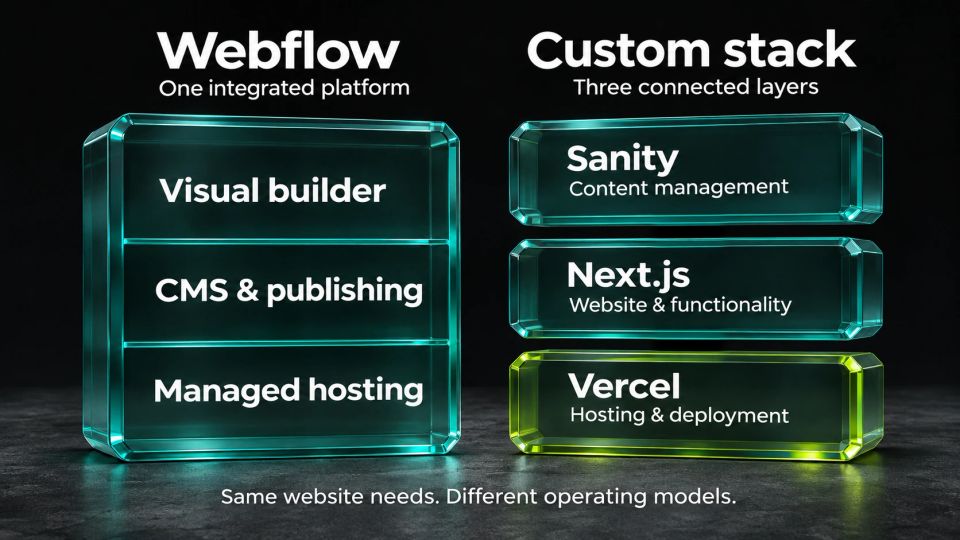
Search for Vercel vs Webflow and it looks like a straightforward platform comparison. At Scaler, the practical alternative to Webflow is a complete stack: Sanity for content, Next.js for the website framework and its functionality, and Vercel for hosting and deployment.
That distinction matters because the website builder is only one part of the decision. The team also needs a place to publish content, a process for reviewing changes, a way to deploy safely, and someone who can maintain the system after launch.
We use both approaches. Webflow makes sense when an integrated visual environment gives the team the control it needs. A custom stack makes sense when the content model, functionality, or integrations need to be designed around the organization. Neither route is automatically more manageable. Manageability comes from matching the system to the people who will run it.
Do you need a developer for every change?
Both routes can support frequent marketing and content work. A Next.js site does not have to send every copy change through a developer. With Sanity configured around the team, editors can update and publish content without touching the codebase. Developers are still needed for new components, structural changes, integrations, and ongoing technical maintenance.
What the products actually do
Webflow combines visual site building, content management, publishing, and managed hosting. Designers and marketers can work with content in context, while developers can extend the platform through APIs, apps, and custom code. That makes Webflow more capable than the simple site-builder label suggests.
Sanity is the content management layer in our custom setup. Its Studio gives editors a tailored interface for creating, reviewing, and publishing structured content. The development team defines the content model, including the fields, relationships, validation, and editorial controls that the organization needs.
Next.js is the framework we use to build the website. It controls how the front end is rendered, how routes and components behave, and how the site connects to Sanity and other services.
Vercel hosts and deploys that Next.js application in this setup. It publishes each approved change from GitHub and gives every change a preview link, so it can be checked before it goes live. Next.js can run elsewhere, but Vercel is the deployment platform we use for this comparison.
GitHub stores the website’s code. Every change our developers make is reviewed there before it goes live and recorded, so any change can be traced or undone. Once a change is approved, Vercel publishes it automatically. Editors never need to open GitHub; their work stays in Sanity.
Put together, Sanity, Next.js, GitHub and Vercel form a custom website system. Webflow provides more of that system inside one platform. The decision is therefore less about choosing one product over another and more about choosing the operating model that fits the work.
Content publishing is different from website development
This is the most important distinction in the comparison. Editing a website is not one type of task.
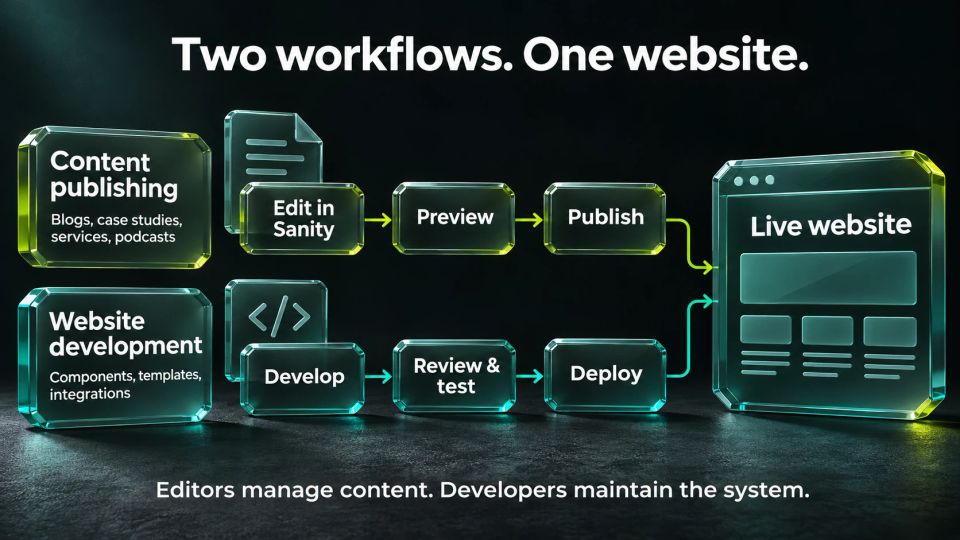
On the Scaler website, the team manages blogs, case studies, services, and other content through Sanity. Editors work in the CMS rather than in the Next.js codebase. They can update the information the content model exposes, preview it through the workflow we have configured, and publish it through the CMS.
A different category of change affects the website itself. A new component, a different page template, an integration, a data flow, or custom functionality requires development work. The same distinction exists in Webflow. Editors can manage content and approved layouts, while more advanced changes may still need a designer or developer.
The useful question is not whether the site needs developers. Most serious websites do at some point. The question is which changes happen frequently, who needs to make them, and whether the system gives those people the right level of control.
When an integrated Webflow setup makes sense
Webflow is a strong fit when the organization wants the visual design environment, CMS, publishing workflow, and hosting to live together. That can reduce the number of systems the team has to coordinate and give marketers or designers more direct control over the site.
It is especially useful when the content structure fits Webflow CMS, the site benefits from visual page building, and the required integrations work comfortably within the platform and its APIs. Our experiment with automated blog imagery shows how far that workflow can extend: the technical setup connected Webflow CMS to an image-generation process, while the editorial team could continue working inside the CMS.
See Experimenting with Webflow CMS and Procedural Image Generation for a practical example of that approach.
An integrated platform does not remove every technical decision. Custom functionality, unusual integrations, strict security requirements, and governance can still require specialist work. In one Webflow project, we added an edge security layer rather than replacing the CMS. That kept the client's publishing workflow intact while addressing an infrastructure requirement outside the CMS itself.
Read How We Took a Webflow Site to a 105/100 Security Score for the full example and its maintenance tradeoff.
When the custom stack makes sense
The custom route becomes attractive when the site needs more control than an integrated platform can provide cleanly. The organization may need its content organized around its own terms and relationships, or a publishing process built around how the team works. The website may also need application-like behavior, bespoke integrations, or a front end that is tightly connected to other systems.
Sanity gives the team a CMS without forcing the front end into a fixed page-building model. Next.js gives developers control over the application. Vercel gives the deployment workflow a clear home. The three parts can evolve independently, which is useful when the website has requirements that do not fit neatly inside one platform.
That flexibility creates responsibility. Someone must maintain the content schema, codebase, dependencies, integrations, deployment settings, and monitoring. If the organization does not have that capability internally or through a partner, the custom route can become harder to own even when the editorial interface is easy to use.
Cost should therefore be assessed across the whole system. Webflow has site plan and Workspace costs, plus the cost of someone looking after the site. A custom stack has CMS and hosting costs, but development and maintenance are usually the larger consideration. Comparing subscription prices alone leaves out the work required to keep either route reliable.
How we run the Scaler website
Our website at Scaler Marketing is built using Sanity, Next.js, and Vercel, with each serving a different purpose.
Sanity is our content management system (CMS), where the team manages everyday content, including blog posts, case studies, services, and podcasts. Next.js controls how the website looks and functions, while Vercel handles hosting and deployment. This separation allows editors to update content without needing to work directly in the codebase.
When we need new content types, components, integrations, or structural changes, our technical team handles the development. Once the necessary fields and controls are configured in Sanity, the wider team can manage that content independently.
We’ve also extended our Sanity setup with five custom publishing features, inspired by workflows we regularly use in Webflow:
- Open a staging preview directly from the CMS.
- Copy the staging URL to share for review.
- Open the published page on the live website.
- Copy the live page URL.
- Schedule posts for publication through a custom solution built using Vercel.
These features weren’t simply available out of the box in our setup. Our developers built them to make everyday publishing more practical and accessible for the wider team.
The distinction is that content management and technical development remain separate. Editors can manage and publish content through Sanity, while changes to the site’s functionality and structure follow our development workflow, including GitHub review, testing, and deployment through Vercel.
This also demonstrates why custom-built websites shouldn’t be viewed as suitable only for smaller businesses or developer-managed projects. They can support substantial content operations without requiring editors to work in code.
Ultimately, the effectiveness of a custom CMS depends on how well its content models, editorial tools, and publishing workflows are designed, rather than whether the website’s front end is custom-coded.
What AI-assisted development changes
AI has changed how quickly our technical team can explore and implement parts of a build. We can use specialized agents for bounded tasks, test more routes in parallel, and spend less time on repetitive implementation. That leaves more time for architecture, data modeling, edge cases, and the user experience.
It does not make the technical owner optional. Someone still has to decide what should be built, review the code, test the behavior, check accessibility and performance, protect the security model, and maintain the result. Faster implementation raises the value of good judgment because the team can create and change more in less time.
The ownership risk that appears after launch was the focus of our earlier blog, AI Builds It. Webflow Keeps It Running. That point still stands. The additional lesson from our own custom setup is that code and marketer control are not mutually exclusive. Sanity gives the publishing team a purpose-built interface, while developers remain responsible for the system around it.
The same principle runs through From Startup to Enterprise: AI can increase a team's reach, but people still provide the architecture, standards, and judgment that make the work dependable.
Webflow vs a custom website for SEO
Neither route wins SEO automatically. Webflow gives marketers and designers direct control over many on-page elements and provides an integrated publishing environment. A Next.js site gives developers detailed control over rendering, metadata, structured data, routing, performance, and integrations. Both can also be implemented poorly.
The practical question is whether the team can maintain the elements that search engines and users depend on: useful content, clear information architecture, crawlable pages, descriptive metadata, internal links, redirects, fast experiences, and reliable publishing.
That is why our approach starts with structure. As we explain in How Information Architecture SEO Builds Authority Beyond Keywords, a website becomes more useful when pages have clear roles and relationships. The CMS and front end must preserve that structure. The platform name does not create it for you.
The Scaler decision framework
We make the choice by looking at the operating model first. The following questions usually reveal which direction deserves closer consideration.
The decision should also reflect how confident the organization feels about changing and maintaining its website. The Website Confidence Gap is a useful reminder that ownership and trust are commercial issues, not simply technical ones.
Final verdict
Webflow is the stronger choice when its integrated visual platform gives the team the editing freedom, functionality, and governance it needs. Next.js with Sanity on Vercel is the stronger choice when a tailored content model, custom functionality, or deeper integrations justify the additional technical ownership.
Our own website shows that a custom build can remain practical for an active marketing team. The CMS handles everyday publishing. The development stack handles the structure and functionality. Human review, testing, and maintenance connect the two.
The right answer is the system your team can use confidently after launch and maintain as the website changes. If you are weighing the two routes, Scaler can assess the content workflow, technical requirements, integrations, and ongoing ownership before recommending a platform.
Ready to compare the options for your website? Start a project with Scaler.
Frequently asked questions
Is Webflow better than Vercel?
They are different product categories. Webflow combines site building, content management, publishing, and hosting. Vercel hosts and deploys code-based applications. The useful comparison is Webflow versus a complete custom stack, such as Next.js with Sanity CMS hosted on Vercel.
How do Sanity, Next.js and Vercel work together?
Sanity stores and manages the website content. Next.js retrieves that content and controls how the website looks and behaves. Vercel hosts and deploys the Next.js application. Together they provide the CMS, front end, and deployment layers that Webflow packages more tightly into one platform.
Can marketers edit a custom website without code?
Yes, if the website has a CMS designed for that purpose. On the Scaler site, editors manage blogs, case studies, services, podcasts, and other content through Sanity. Developers are needed when a change affects the content model, page structure, components, integrations, or application behavior.
Is Sanity an alternative to Webflow CMS?
Sanity can replace the CMS part of a Webflow setup, but it does not replace the entire Webflow platform. Sanity manages structured content and editorial workflows. A separate front end, hosting platform, design system, and development process are still required to deliver the finished website.
Can a custom website support frequent content publishing?
Yes. Publishing frequency depends on the CMS and workflow, not on whether the front end was built in code. A well-designed Sanity Studio can give editors structured fields, previews, validation, and publishing controls while developers maintain the Next.js application separately.
When is Webflow the simpler choice?
Webflow is often simpler when the organization wants visual design, CMS, publishing, and hosting in one environment and its requirements fit the platform. It can reduce the number of systems and specialists involved, especially when marketers and designers need direct control over approved content and layouts.
When is a custom CMS and website stack worth the cost?
The custom route is worth considering when the site needs a tailored content model, bespoke functionality, deep integrations, or front-end control that would be awkward inside an integrated platform. The added flexibility should justify the development, maintenance, monitoring, and technical ownership the system requires.
Is Webflow or a custom site better for SEO?
Neither is inherently better for SEO. Webflow provides an integrated publishing environment and direct controls for many common tasks. Next.js offers detailed implementation control. Results depend on content quality, architecture, crawlability, metadata, internal linking, page experience, and the team's ability to maintain them.
How does AI-assisted development change the decision?
AI can reduce implementation time and help technical teams explore more options, but it does not remove the need for architecture, review, testing, security, accessibility, and maintenance. It makes custom development more efficient. It does not make an unowned codebase easier for a marketing team to run.